Why You Need an Offline Music Player App on Android
Music streaming has changed how people discover and listen to songs. With thousands of songs available online, streaming platforms have become a common choice for many users.
However, an offline music player for Android still offers important advantages that online streaming cannot always provide.
Many users prefer having their own music collection stored on their phones because it gives them more control, better reliability, and the ability to listen anywhere without an internet connection.
A dedicated MP3 music player app allows you to enjoy your favorite songs whenever you want, even when you are offline.
What Makes Offline Music Players Useful?
An offline music player is designed to play audio files stored directly on your smartphone.
Instead of depending on an online service, your music library stays on your device.
This means you can:
- Play downloaded MP3 songs
- Create personal playlists
- Listen without internet
- Avoid streaming interruptions
- Manage your own music collection
For Android users who already have music files, an offline audio player is a simple and practical solution.
1. Listen to Music Without Internet Connection
One of the biggest advantages of an offline music player is that it works without Wi-Fi or mobile data.
There are many situations where internet access may not be available:
- During flights
- While traveling
- In rural areas
- During network problems
- When saving mobile data
With your songs stored locally, your music is always ready whenever you need it.
2. Save Mobile Data Usage
Streaming music can consume a significant amount of mobile data, especially when listening for several hours every day.
An offline MP3 player helps reduce data usage because songs are played directly from your device storage.
This is useful for users who:
- Have limited data packages
- Want to reduce monthly expenses
- Listen to music frequently
Download your songs once and enjoy them repeatedly without using additional internet data.
3. No Buffering or Connection Problems
Have you ever experienced music stopping because of a slow internet connection?
Online streaming depends on network quality. If your connection becomes unstable, playback may pause or reduce audio quality.
An offline music player removes this problem.
Since songs are stored locally, playback remains smooth without waiting for data loading.
4. More Control Over Your Music Library
Streaming platforms organize music based on their own systems.
With an offline music player app, you control your own collection.
You can organize songs based on:
- Favorite tracks
- Artists
- Albums
- Personal playlists
- Recently played songs
Your music library belongs to you.
5. Better Privacy and Simplicity
Many users prefer simple applications that focus on one purpose.
A local music player does not require you to constantly browse online catalogs or create accounts to listen to your own songs.
You can simply open the app, select a song, and start listening.
A lightweight Android music player provides a straightforward experience without unnecessary complexity.
6. Create Playlists for Every Moment
Music is connected with different activities and moods.
A good MP3 player app allows you to create playlists such as:
🎧 Morning music
🏃 Workout songs
🚗 Road trip playlist
📚 Study music
🌙 Relaxing tracks
Personal playlists make it easier to find the right songs quickly.
Offline Music Player vs Music Streaming Apps
Both offline players and streaming services have their own advantages.
| Feature | Offline Music Player | Streaming App |
|---|---|---|
| Internet required | No | Usually yes |
| Data usage | Very low | Higher |
| Plays personal files | Yes | Limited |
| Buffering issues | No | Possible |
| Account needed | Usually no | Often required |
| Music ownership | Your files | Platform access |
For users who enjoy downloaded music, an offline player provides a more personal experience.
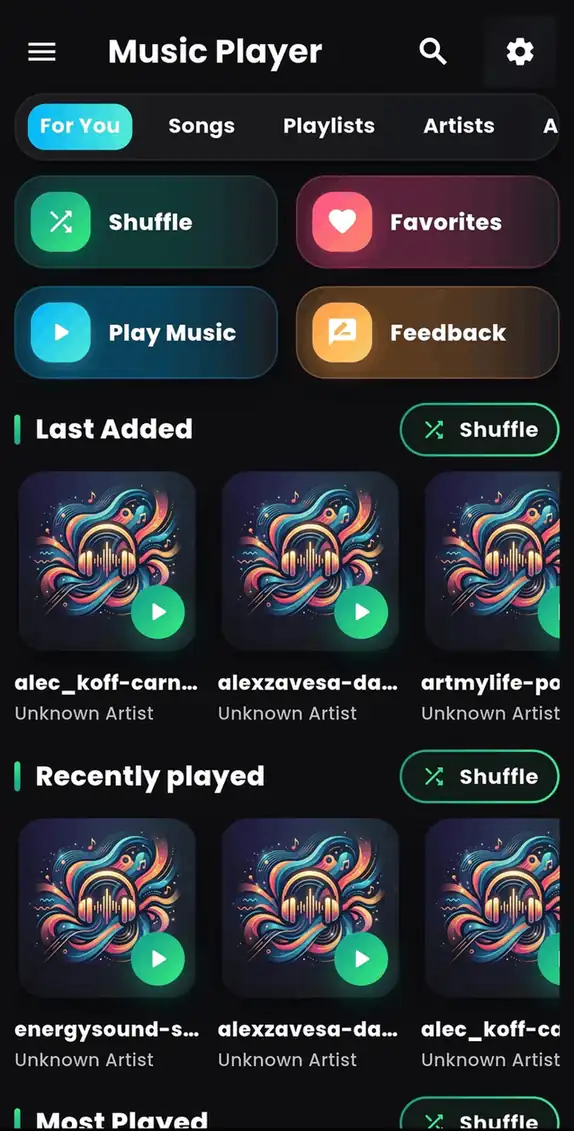
Music Player - MP3 Audio: A Simple Android Music Solution
If you are looking for a simple way to play your local music files, Music Player - MP3 Audio provides an easy solution.
The app is designed for Android users who want:
✓ Offline MP3 playback
✓ Easy music browsing
✓ Playlist management
✓ Smooth audio controls
✓ A simple listening experience
Instead of searching through files manually, a dedicated music player helps organize your songs and makes playback easier.
Who Should Use an Offline MP3 Player?
An offline music player is useful for:
Travelers
Enjoy music during trips without worrying about internet availability.
Students
Listen to background music while studying without distractions.
Fitness Users
Play workout playlists without carrying internet dependency.
Music Lovers
Keep your favorite songs organized in one place.
How to Get Music Player - MP3 Audio
Getting started is simple.
- Open Google Play Store.
- Search for Music Player - MP3 Audio.
- Install the app.
- Allow music access permission.
- Start enjoying your songs.
Download the app here:
👉 Music Player - MP3 Audio on Google Play:
https://play.google.com/store/apps/details?id=com.byteblazestudios.audioplayer&hl=en
Frequently Asked Questions
Is an offline music player better than streaming?
It depends on your needs. Offline players are better for users who want to listen to their own downloaded songs without internet.
Can I use a music player without Wi-Fi?
Yes. Offline music players can play songs stored on your phone without Wi-Fi.
Does offline music save battery?
Offline playback can reduce network activity because music does not need continuous internet streaming.
Can I make playlists offline?
Yes. Most offline music apps support playlist creation and music organization.
Final Thoughts
Even with the popularity of streaming services, offline music players remain valuable for Android users who want simplicity, control, and reliable playback.
A good MP3 player app for Android allows you to enjoy your favorite songs anywhere without worrying about internet connection, buffering, or data usage.
If you want a simple way to manage and play your local music collection, try:
🎵 Music Player - MP3 Audio
Download now:
👉 https://play.google.com/store/apps/details?id=com.byteblazestudios.audioplayer&hl=en