Why Choose a Private Offline Music Player for Android?
Music apps have changed significantly over the years. Today, many people use online streaming platforms to discover and listen to songs.
However, not every user wants a streaming service that requires constant internet access, accounts, subscriptions, or online recommendations.
Many Android users prefer a private music player app that simply plays their own songs stored on their device.
A local offline MP3 player gives you complete control over your music library while keeping your listening experience simple.
What Is a Private Music Player?
A private music player is an application that focuses on playing your personal audio files instead of providing an online streaming service.
Your songs stay on your device, and the app works as a personal audio library.
A local music player allows you to:
- Play downloaded MP3 songs
- Organize your music collection
- Create personal playlists
- Listen without internet
- Control your own library
Unlike streaming platforms, your music experience is based on your own files.
Why Do Users Prefer Offline Music Players?
1. No Account Required for Personal Music
Many streaming services require users to create accounts before accessing features.
A local Android music player provides a simpler approach.
You can open the app, select your songs, and start listening.
There is no need to:
- Create an account
- Manage subscriptions
- Depend on online services
Your music is ready whenever you need it.
2. Your Music Library Stays Under Your Control
With streaming platforms, access to songs depends on the service.
Songs can change because of:
- Licensing agreements
- Regional availability
- Platform changes
With a local MP3 player, your downloaded music collection remains available on your device.
You decide:
- Which songs to keep
- Which playlists to create
- How to organize your library
3. Listen Without Internet Connection
Internet access is not always reliable.
You may need music while:
- Traveling
- Flying
- Exercising outdoors
- Visiting places with weak network coverage
An offline music player allows uninterrupted listening without depending on Wi-Fi or mobile data.
4. Reduce Data Usage
Streaming music continuously uses internet data.
For people who listen to music frequently, this can increase monthly data usage.
An offline music player saves data because songs are played directly from your phone storage.
Download your songs once and enjoy them anytime.
5. Avoid Unnecessary Features
Some music applications include many additional features that users may never use.
A simple MP3 player focuses on the essentials:
- Play music
- Manage songs
- Create playlists
- Control playback
A clean design makes the experience faster and easier.
Local Music Player vs Streaming Music Apps
| Local Music Player | Streaming App |
|---|---|
| Plays your own files | Uses online catalog |
| Works offline | Requires internet |
| No monthly subscription | May require subscription |
| More control over songs | Depends on service |
| Lower data usage | Continuous data usage |
Both options can be useful, but offline players are ideal for users who already own music files.
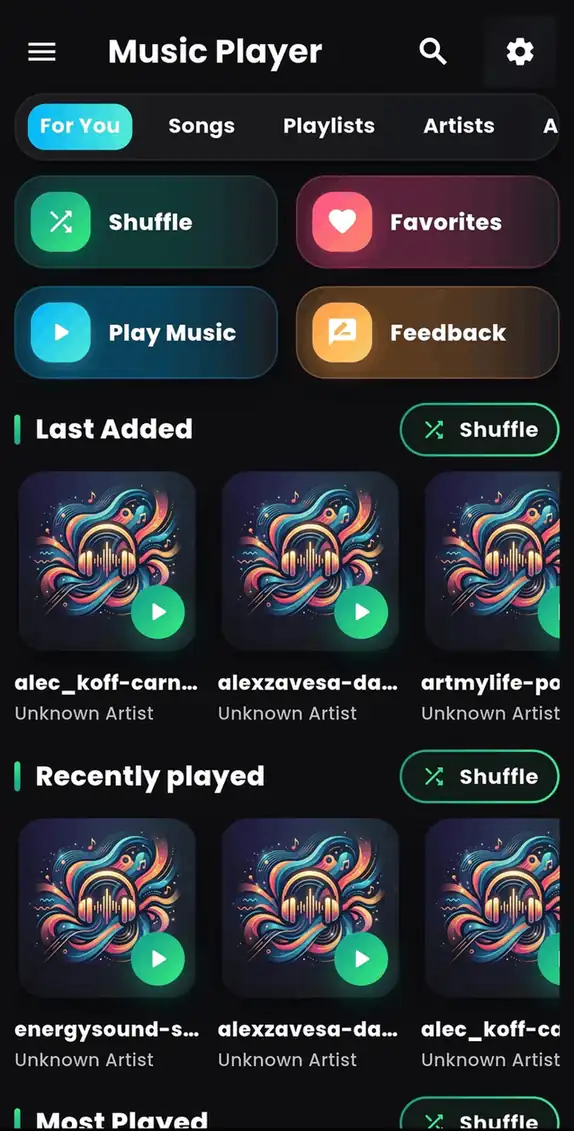
Music Player - MP3 Audio: Simple Local Music Experience
Music Player - MP3 Audio is designed for Android users who want a convenient way to enjoy their personal music collection.
The app helps you play and organize local audio files with a simple interface.
Features include:
✓ Offline MP3 playback
✓ Personal music library management
✓ Playlist organization
✓ Easy audio controls
✓ Smooth listening experience
Whether you have downloaded songs, transferred music from a computer, or stored audio files on your device, the app provides an easy way to enjoy them.
How to Start Using Music Player - MP3 Audio
Getting started is simple:
Step 1:
Download Music Player - MP3 Audio from Google Play.
Step 2:
Allow access to your music files.
Step 3:
Let the app scan your songs.
Step 4:
Start listening to your favorite tracks.
Download here:
👉 https://play.google.com/store/apps/details?id=com.byteblazestudios.audioplayer&hl=en
Who Should Use a Private Music Player?
A local MP3 player is useful for:
People With Personal Music Collections
If you already have hundreds of downloaded songs, a music player helps organize them.
Users With Limited Internet
Offline playback avoids dependence on mobile data.
People Who Prefer Simplicity
A focused music app provides a cleaner experience.
Travelers
Enjoy music anywhere without worrying about connectivity.
Tips for Managing Your Private Music Library
Organize Songs Properly
Use folders and categories to keep your music collection clean.
Create Playlists
Make playlists based on activities, moods, or genres.
Remove Duplicate Files
Cleaning unnecessary files improves organization.
Keep Backup Copies
Store important music files safely.
Frequently Asked Questions
Can I listen to music without creating an account?
Yes. Local music player apps allow you to play your own audio files without requiring a streaming account.
Does an offline music player need internet?
No. After your songs are stored on your device, you can listen without internet.
Are local music players safe?
Using a trusted music player from a reliable developer helps provide a safer and simpler listening experience.
Can I create playlists offline?
Yes. Many offline MP3 players support playlist creation without internet access.
Final Thoughts
A good music player should give users freedom and control over their own songs.
While streaming services are useful, many Android users still prefer a simple offline music player that plays their personal collection without unnecessary requirements.
Music Player - MP3 Audio provides an easy way to organize and enjoy your songs anytime.
🎵 Download Music Player - MP3 Audio:
👉 https://play.google.com/store/apps/details?id=com.byteblazestudios.audioplayer&hl=en
Enjoy your personal music library anywhere.