Download Music Player - MP3 Audio for Android
Music is a part of our daily routine. Whether you are traveling, working out, studying, or relaxing, having a reliable music player app makes listening to your favorite songs easier.
Many Android users prefer an offline music player because they want to enjoy their own downloaded songs without depending on internet connectivity.
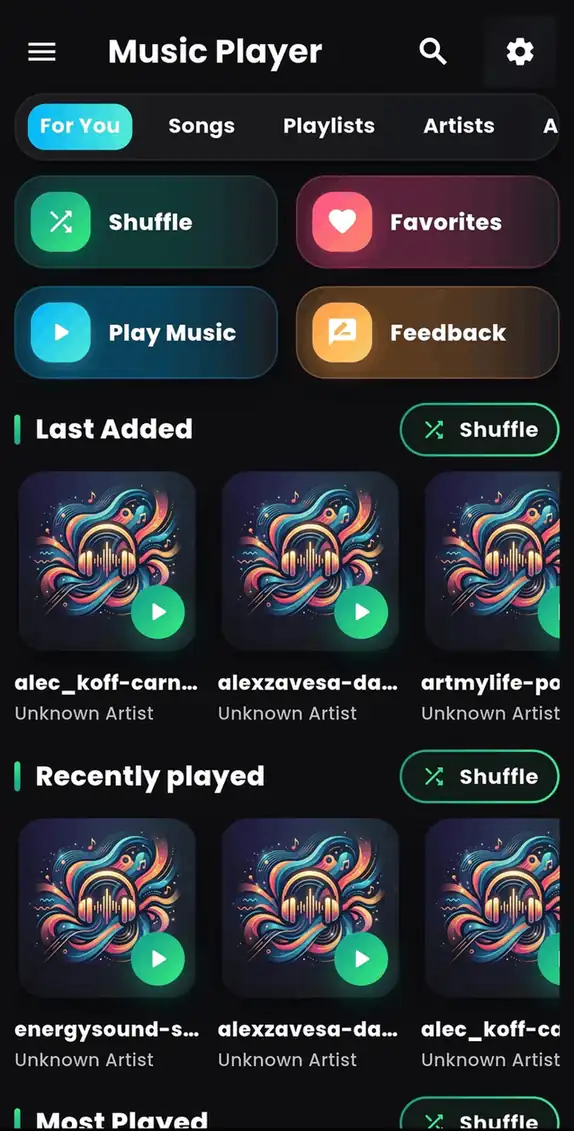
Music Player - MP3 Audio is a simple and lightweight Android music player designed for users who want a smooth way to play MP3 songs, organize their music library, and enjoy audio anytime.
Download Music Player - MP3 Audio
If you are searching for a free MP3 player app for Android, offline music player, or a simple audio player app, Music Player - MP3 Audio provides an easy solution.
Download the app and turn your Android device into your personal music library.
👉 Download Music Player - MP3 Audio from Google Play:
https://play.google.com/store/apps/details?id=com.byteblazestudios.audioplayer&hl=en
Why Download an Offline Music Player App?
Online music streaming services are useful, but they often require:
- Internet connection
- Mobile data usage
- Account registration
- Subscription plans
An offline MP3 player gives you freedom to listen to your own songs without these limitations.
With Music Player - MP3 Audio, you can:
- Play downloaded MP3 songs
- Listen without internet
- Manage your music collection
- Create playlists
- Enjoy smooth audio playback
Listen to MP3 Songs Without Internet
One of the biggest advantages of an offline music player for Android is that your songs are always available.
Whether you are:
- On a flight
- Traveling in remote areas
- Saving mobile data
- Using limited internet
You can still enjoy your favorite music.
Simply download Music Player - MP3 Audio, scan your device music files, and start listening.
Organize Your Music Library Easily
Finding songs among hundreds of audio files can be difficult without a proper music management system.
Music Player - MP3 Audio helps you access your songs easily and provides a convenient way to manage your personal music collection.
You can organize music based on:
- Songs
- Albums
- Artists
- Playlists
- Recently played tracks
A dedicated Android music player app makes your listening experience faster and more enjoyable.
Create Personalized Playlists
Everyone has different music preferences.
Some people enjoy energetic workout songs, while others prefer relaxing music before sleep.
With playlist support, you can create collections for:
🎵 Workout music
🎵 Travel songs
🎵 Favorite tracks
🎵 Study playlists
🎵 Relaxing music
Your music should match your mood.
Smooth Audio Playback Experience
A good music player should be fast, simple, and easy to use.
Music Player - MP3 Audio focuses on providing a clean experience for everyday listening.
The app is designed for:
- Quick access to songs
- Simple controls
- Easy navigation
- Comfortable listening
Whether you have a small music collection or thousands of songs, the app helps you enjoy your audio files conveniently.
Music Player - MP3 Audio Features
Key features include:
✓ Offline MP3 music playback
✓ Simple music library management
✓ Playlist support
✓ Easy song browsing
✓ Smooth audio controls
✓ Lightweight Android application
✓ Personal music collection management
Who Should Download Music Player - MP3 Audio?
This app is suitable for Android users who want:
- A simple offline music player
- A free MP3 player app
- A lightweight audio player
- A way to organize downloaded songs
- Music playback without internet
If you prefer listening to your own music files instead of streaming, this app can be a useful addition to your smartphone.
How to Install Music Player - MP3 Audio on Android
Installing the app is simple:
Step 1:
Open Google Play Store.
Step 2:
Search for Music Player - MP3 Audio.
Step 3:
Tap the Install button.
Step 4:
Allow music access permission and start enjoying your songs.
You can also install it directly from the link below:
👉 Download Music Player - MP3 Audio:
https://play.google.com/store/apps/details?id=com.byteblazestudios.audioplayer&hl=en
Frequently Asked Questions (FAQ)
Is Music Player - MP3 Audio free?
Yes, Music Player - MP3 Audio is available for Android users who want a simple way to play their music files.
Can I play music without internet?
Yes. The app works as an offline music player and can play songs stored on your device.
Does it download songs from the internet?
No. The app is designed to play music files already available on your device.
Is it only for MP3 files?
The app is designed for local audio playback and supports common music formats available on Android devices.
Enjoy Your Music Anywhere
A good music player should make listening simple.
Music Player - MP3 Audio helps Android users enjoy their favorite songs with offline playback, easy organization, and smooth controls.
If you are looking for a music player app for Android, offline MP3 player, or a simple way to manage your songs, download Music Player - MP3 Audio today.
🎧 Start listening to your favorite music anytime.
👉 Install Music Player - MP3 Audio now:
https://play.google.com/store/apps/details?id=com.byteblazestudios.audioplayer&hl=en