How to Organize Music on Android and Manage Your MP3 Songs Easily
Smartphones have replaced many traditional music players. Today, millions of people store their favorite songs directly on their Android devices.
However, as your music collection grows, finding specific songs can become difficult. Hundreds of MP3 files, duplicate tracks, and unorganized folders can make listening frustrating.
A proper music player app for Android helps solve this problem by giving you a simple way to organize, browse, and enjoy your songs.
With the right tools, your phone can become a complete personal music library.
Why Should You Organize Your Music Library?
A messy music collection creates unnecessary problems.
Without proper organization, you may experience:
- Difficulty finding favorite songs
- Duplicate audio files
- Long searching times
- Poor playlist management
- A confusing listening experience
Organizing your music helps you quickly access the songs you want.
Whether you have 50 songs or thousands of tracks, a structured music library makes everything easier.
1. Keep Your Music Files Organized
The first step to managing music on Android is keeping your audio files organized.
You can arrange songs by:
- Artist
- Album
- Genre
- Language
- Mood
- Activity
For example:
Workout Playlist
- Energetic songs
- Fast music
- Motivational tracks
Relax Playlist
- Slow songs
- Instrumental music
- Calm tracks
A well-organized collection makes music discovery much faster.
2. Use a Dedicated Music Player App
Many Android users open music files manually from file managers. However, this is not the most convenient way to enjoy music.
A dedicated MP3 player app provides features designed specifically for listening.
A good music player can help you:
- Scan your music library
- Browse songs easily
- Create playlists
- Manage favorite tracks
- Control playback
Instead of searching through folders, everything becomes available in one simple interface.
3. Create Playlists Based on Your Lifestyle
Playlists make your music experience more personal.
Instead of scrolling through hundreds of songs, you can create collections for different moments.
Popular playlist ideas include:
Morning Playlist
Songs that help you start your day with energy.
Workout Playlist
Fast and motivating music for exercise sessions.
Study Playlist
Relaxing background music for concentration.
Travel Playlist
Favorite songs for long journeys.
Sleep Playlist
Calm music for relaxation.
A music player with playlist support makes switching between moods easier.
4. Remove Unwanted and Duplicate Songs
Over time, Android devices may collect unnecessary audio files.
These can include:
- Duplicate downloads
- Old recordings
- Unwanted audio files
- Temporary files
Cleaning your music collection helps:
- Save storage space
- Improve organization
- Make searching easier
A cleaner library creates a better listening experience.
5. Store Your Favorite Songs Offline
Many users enjoy streaming services, but having offline music provides additional flexibility.
Offline songs allow you to:
- Listen without internet
- Save mobile data
- Avoid buffering
- Access music anywhere
An offline music player for Android lets you enjoy your personal collection whenever you want.
6. Manage Music Without Internet
One of the biggest advantages of a local music player is independence from internet connectivity.
You can enjoy your songs:
- During flights
- While traveling
- In areas with weak networks
- Without using mobile data
Your music library stays available directly on your phone.
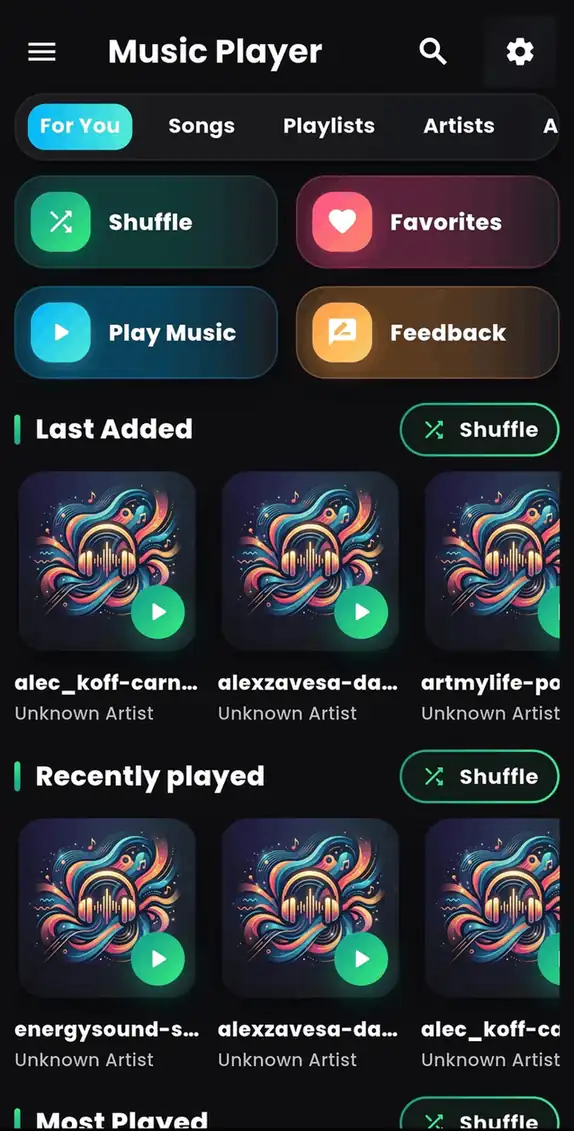
Music Player - MP3 Audio: Organize and Enjoy Your Songs
Music Player - MP3 Audio is designed for Android users who want a simple way to manage and play their local music files.
The app helps users enjoy their personal music collection with features like:
✓ Offline music playback
✓ MP3 song management
✓ Playlist organization
✓ Easy music browsing
✓ Smooth audio controls
Whether you have a small collection or a large library, the app provides a convenient way to enjoy your favorite songs.
How to Improve Your Android Music Experience
Follow these simple tips:
Keep Your Songs Updated
Remove songs you no longer listen to and keep your library clean.
Create Custom Playlists
Organize music according to activities and moods.
Use Quality Audio Files
Higher-quality audio files provide better listening experiences.
Use a Reliable Music Player
A good player makes browsing and playback smoother.
Why Choose an MP3 Player Instead of Opening Audio Files Manually?
Opening individual songs from a file manager is inconvenient.
A dedicated music player provides:
| File Manager | Music Player App |
|---|---|
| Basic file access | Music-focused interface |
| No playlist management | Create playlists |
| Limited controls | Full playback controls |
| Harder song browsing | Organized library |
A music player transforms scattered audio files into a proper music experience.
Frequently Asked Questions
How do I organize music files on Android?
You can organize music by using folders, removing unwanted files, and using a dedicated MP3 player app.
What is the best way to manage MP3 songs?
A music player app with library management and playlist features is one of the easiest ways to manage MP3 songs.
Can I organize music without internet?
Yes. Offline music player apps allow you to manage and play local songs without an internet connection.
Can I create playlists on Android?
Yes. Many music player apps support custom playlists for organizing your favorite tracks.
Final Thoughts
A growing music collection needs proper organization. Without a good system, finding and enjoying your favorite songs can become difficult.
Using a dedicated Android music player app helps you manage MP3 files, create playlists, and enjoy a smoother listening experience.
If you want a simple way to organize and play your songs, try:
🎵 Music Player - MP3 Audio
Download the app:
👉 https://play.google.com/store/apps/details?id=com.byteblazestudios.audioplayer&hl=en
Start organizing your music and enjoy your favorite songs anytime.