How to Listen to Music Offline on Android Without Internet
Music is one of the easiest ways to relax, focus, and enjoy your free time. Many people listen to music while traveling, exercising, studying, or working.
However, streaming music online is not always convenient. Poor network connections, limited mobile data, and subscription requirements can make online music difficult to access.
The best solution is using an offline music player for Android that allows you to play songs stored directly on your device.
With an offline MP3 player, you can enjoy your favorite music anytime without needing Wi-Fi or mobile internet.
What Is an Offline Music Player?
An offline music player is an Android application that plays audio files stored on your smartphone.
Unlike streaming platforms, offline music apps do not depend on internet connectivity. Your songs are stored locally, and the app helps you organize and play them easily.
Examples of supported music files may include:
- MP3 songs
- Audio recordings
- Downloaded music files
- Local audio collections
A good offline music player turns your smartphone into a personal music library.
Why Listen to Music Offline?
There are many reasons Android users prefer offline music apps.
1. Save Mobile Data
Streaming music continuously uses internet data.
If you listen to music every day, your data usage can increase quickly.
With an offline music player, your songs are already stored on your device, so you can listen without consuming mobile data.
2. Listen Anywhere Without Internet
Internet connection is not available everywhere.
You may experience poor network coverage during:
- Air travel
- Road trips
- Remote locations
- Underground areas
- Outdoor activities
Offline music apps allow you to continue listening even when there is no connection.
3. No Buffering Problems
Online music can stop or reduce quality when the internet connection becomes unstable.
Offline playback provides a smoother experience because the audio file is already available on your phone.
How to Play Music Offline on Android
Follow these simple steps:
Step 1: Download Music Files
First, save your favorite songs on your Android device.
You can transfer music from:
- Your computer
- Cloud storage
- Other devices
- Purchased music libraries
Step 2: Install an Offline Music Player App
A dedicated MP3 player app for Android helps you organize and play your songs easily.
One recommended option is:
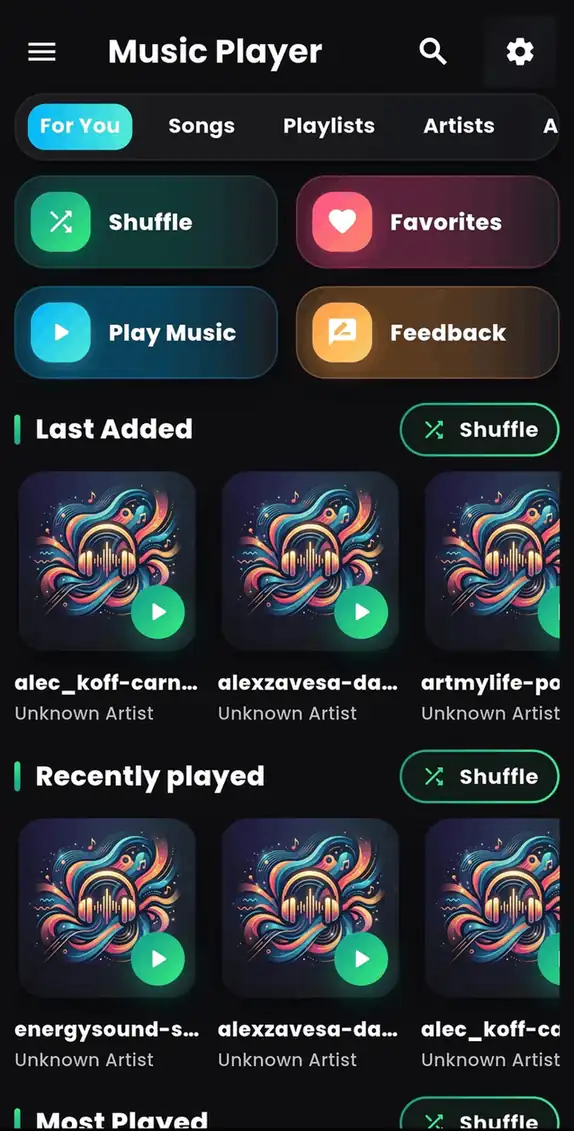
Music Player - MP3 Audio
Music Player - MP3 Audio is a simple Android application designed for playing local music files with convenient controls and playlist management.
Download it here:
👉 https://play.google.com/store/apps/details?id=com.byteblazestudios.audioplayer&hl=en
Step 3: Scan Your Music Library
After installing a music player:
- Allow required music access permission
- Scan available audio files
- Browse your songs
- Start listening
Your device becomes a personal offline music system.
Offline Music Player vs Online Streaming
Both options have advantages, but they are designed for different needs.
| Offline Music Player | Online Streaming |
|---|---|
| Works without internet | Requires internet |
| Uses less mobile data | Uses continuous data |
| Plays your own songs | Uses online catalog |
| No buffering | Depends on connection |
| More control over files | More discovery features |
For users who already have downloaded songs, an offline music player is often more practical.
Features to Look for in an Android Music Player
A good music player app should provide useful features without unnecessary complexity.
Important features include:
Easy Music Organization
The app should help you find songs quickly by organizing your music library.
Playlist Support
Creating playlists makes it easier to organize music for different activities.
Examples:
- Workout playlist
- Travel playlist
- Relaxing songs
- Favorite tracks
Simple Controls
Music playback should be easy with accessible controls for:
- Play
- Pause
- Skip
- Previous song
- Volume adjustment
Lightweight Performance
A good Android music player should run smoothly without using excessive storage or battery.
Benefits of Using Music Player - MP3 Audio
Music Player - MP3 Audio is designed for Android users who want a simple way to enjoy their personal music collection.
The app helps users:
✓ Play offline MP3 songs
✓ Manage music files easily
✓ Create playlists
✓ Enjoy music without internet
✓ Access songs quickly
Whether you are traveling, studying, exercising, or relaxing, having a dedicated music player makes listening more convenient.
Frequently Asked Questions
Can I listen to music without internet on Android?
Yes. You can listen to offline music by using a music player app that plays songs stored on your device.
Do offline music players use mobile data?
No. Offline music playback does not require mobile data after your songs are stored locally.
What is the best way to play MP3 songs on Android?
Using a dedicated MP3 music player app provides better organization and playback control compared to opening audio files individually.
Can I create playlists without internet?
Yes. Most offline music players allow playlist creation without an internet connection.
Final Thoughts
Listening to music offline is still one of the easiest and most reliable ways to enjoy songs on Android.
An offline music player helps you avoid buffering, save mobile data, and keep your favorite tracks available anytime.
If you are searching for a free MP3 player app, offline music player for Android, or a simple way to manage your songs, try:
🎵 Music Player - MP3 Audio
Download now:
👉 https://play.google.com/store/apps/details?id=com.byteblazestudios.audioplayer&hl=en