How a Digital Compass App Helps You Navigate During Travel, Hiking and Outdoor Adventures
Exploring new places is exciting, but getting familiar with your surroundings can sometimes be challenging.
Whether you are hiking through a forest, traveling to a new city, camping in nature, or simply trying to understand your direction, having a reliable navigation tool can make your journey easier.
A smartphone can now replace many traditional navigation tools. With a digital compass app, you can quickly find directions, check your heading, and access location information directly from your Android device.
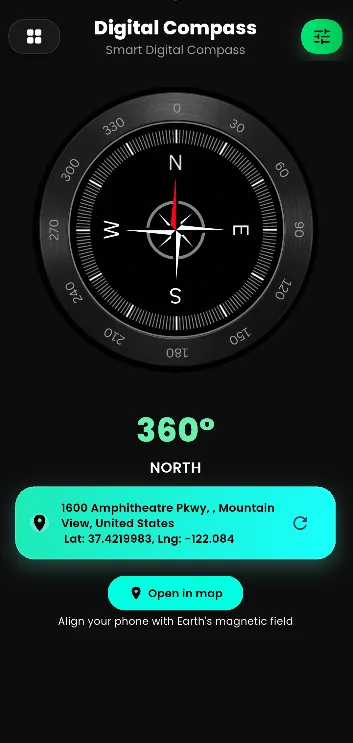
Digital Compass & GPS Location by Byte Blaze Studios transforms your phone into a simple navigation companion for everyday use and outdoor adventures.
Download the app:
👉 Digital Compass & GPS Location
https://play.google.com/store/apps/details?id=com.byteblazestudios.digitalcompass&hl=en
Why Carry a Digital Compass on Your Phone?
Traditional compasses have helped travelers navigate for hundreds of years. Today, smartphones make navigation more convenient by combining compass technology with modern sensors.
A digital compass app for Android can help you:
- Find North, South, East, and West directions
- Understand your current heading
- Check your location information
- Navigate unfamiliar places
- Improve outdoor awareness
Many compass apps use smartphone sensors such as magnetometers and motion sensors to determine direction. Google Play
Digital Compass for Hiking and Camping
Outdoor activities often require better awareness of direction.
When hiking or camping, a compass app can be useful for:
- Following trails
- Understanding surroundings
- Finding your way back
- Exploring unfamiliar locations
A lightweight navigation tool on your phone means you do not need to carry extra equipment.
Whether you enjoy hiking, trekking, camping, or exploring nature, a digital compass can become a useful part of your outdoor toolkit.
GPS Location and Compass: A Powerful Combination
A normal compass shows direction, but combining it with GPS location creates a more complete navigation experience.
A GPS compass app can help users understand:
- Current location
- Direction of movement
- Geographic position
- Navigation information
GPS coordinates are commonly represented using:
- Latitude
- Longitude
These details can be useful when sharing locations or identifying specific places.
Digital Compass & GPS Location App
Digital Compass & GPS Location by Byte Blaze Studios is designed for Android users who want a simple and convenient navigation tool.
The app helps users quickly check direction and location information from their smartphone.
Features include:
✓ Digital compass navigation
✓ Direction finder
✓ GPS location information
✓ Easy-to-use interface
✓ Useful travel companion
✓ Simple navigation experience
Download now:
👉 https://play.google.com/store/apps/details?id=com.byteblazestudios.digitalcompass&hl=en
Best Situations to Use a Digital Compass App
1. Traveling to New Places
When visiting unfamiliar locations, knowing your direction can be helpful.
A compass app can assist travelers by providing quick direction information anywhere.
2. Hiking and Trekking
Outdoor explorers often need navigation tools that are easy to carry.
A phone compass can help hikers:
- Understand trail directions
- Stay aware of orientation
- Explore confidently
3. Camping Adventures
Camping locations may not always have clear landmarks.
A digital compass can help campers understand their surroundings and direction.
4. Everyday Navigation
A compass app is not only for adventures.
You can use it for everyday situations:
- Finding direction in a new neighborhood
- Understanding map orientation
- Learning geography
- Checking your heading
How Does a Digital Compass Work?
Your smartphone contains sensors that detect movement and magnetic fields.
The main sensor used by compass apps is the:
Magnetometer
A magnetometer detects Earth's magnetic field and helps determine direction.
Other sensors may help improve orientation and movement detection.
For better accuracy, users should avoid magnetic interference from magnets or magnetic phone accessories. Google Play
Tips for Getting Better Compass Accuracy
Follow these tips for improved results:
Calibrate Your Phone
If the direction seems incorrect, recalibrate your phone by moving it in a figure-eight motion.
Avoid Magnetic Objects
Keep your phone away from:
- Magnets
- Magnetic phone covers
- Large metal objects
Hold Your Device Properly
Keep your phone flat and stable while checking directions.
Digital Compass vs Maps: Which One Should You Use?
Both tools have different purposes.
| Digital Compass | Maps Application |
|---|---|
| Shows direction | Shows routes |
| Works with phone sensors | Uses maps and GPS |
| Useful for orientation | Useful for navigation paths |
| Simple and quick | Detailed location planning |
A compass and map can work together to provide better navigation awareness.
Who Should Use Digital Compass & GPS Location?
Travelers
Find directions while exploring new destinations.
Hikers
Carry a lightweight navigation tool during outdoor activities.
Students
Learn about directions and geography.
Drivers
Understand orientation while traveling.
Adventure Lovers
Improve navigation during exploration.
How to Use Digital Compass & GPS Location
Using the app is easy:
Step 1:
Download the app from Google Play.
Step 2:
Open Digital Compass & GPS Location.
Step 3:
Allow required permissions.
Step 4:
Hold your phone properly.
Step 5:
View your direction and location information.
Download:
👉 https://play.google.com/store/apps/details?id=com.byteblazestudios.digitalcompass&hl=en
Frequently Asked Questions
Can my phone work as a compass?
Yes. Many smartphones include sensors that allow compass applications to detect direction.
Does a digital compass need GPS?
A compass can use device sensors for direction, while GPS provides additional location information.
Is a compass app useful for hiking?
Yes. Many hikers use digital compass apps as a lightweight navigation tool during outdoor activities. Android Authority
How do I find North using my phone?
Open a digital compass app and hold your phone flat to view the North direction.
Final Thoughts
Navigation does not always require expensive equipment. Your smartphone already contains powerful tools that can help you understand direction and location.
With Digital Compass & GPS Location, you can turn your Android phone into a convenient navigation companion for travel, hiking, camping, and everyday exploration.
Download today:
🧭 Digital Compass & GPS Location
👉 https://play.google.com/store/apps/details?id=com.byteblazestudios.digitalcompass&hl=en
Explore new places. Find your direction. Navigate smarter.